
MySQL query performance: a deep dive into indexes
Learn how MySQL works internally and how to optimize your queries.

Hello developers, welcome everyone to Microservices Insiders. After many years working with MySQL I wanted to write this article to explain how this popular and always reliable database engine works inside.
The article delves into the internal workings of MySQL, focusing on how data is stored and how indexes function to optimize query performance. Key topics include:
Data Storage in MySQL/InnoDB: Data is stored in structures called "pages," each typically 16KB in size. These pages contain rows of data, and when one is filled, a new page is created. Pages are grouped into "extents," and extents into "segments."
Page Structure: Each page comprises a header with metadata, the main body with data rows, and a footer acting as an internal directory or index for quick data location within the page.
Indexes in MySQL: Indexes are structures that enhance search operations on data tables, improving retrieval performance. There are two main types:
Clustered Indexes: In InnoDB, there's a single clustered index per table, built using the primary key. Data is stored in a B-Tree structure, with leaf nodes containing the actual data rows.
Non-Clustered (Secondary) Indexes: These indexes don't store data themselves but hold pointers to data in the data pages.
Analyzing and Optimizing Queries: The article emphasizes the importance of understanding how data is stored and indexed to effectively analyze and optimize query performance.
Let’s start.
How is information stored in MySQL?
In MySQL, when we create a table and add data, the information is stored in structures called pages. A page is the basic unit of information and has a default size of 16KB. Pages store the rows of data that we add. When a page is full, a new one is created, and so on.
Two other important concepts for understanding MySQL's internal structure are extends and segments. Extends are a group of contiguous pages, and segments are a collection of extends.
Regarding pages, there are two main types: data pages and index pages. In this post, we will discuss both, starting with data pages.
A data page can be graphically represented as follows:
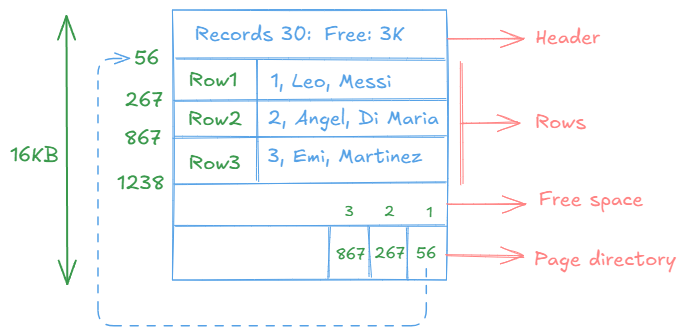
Each page contains a header with general information and metadata about the page, such as the number of records it holds and the available space, among other details. The main body of the page contains the data we add to the table, and at the end, there is a kind of directory or internal index for the page, which allows direct access to the position of each record. Do not confuse these indexes with the ones we create; these are specific to the page itself.
In MySQL with InnoDB, if a table is not explicitly assigned a primary key, one will be implicitly assigned. This ensures that created tables already have an implicit clustered index (we will discuss this later). In other database engines, this does not happen, and in tables without an explicit index defined, the pages are grouped in a structure called a heap.
As data is added and pages are filled, new pages of information are created.
How to know how many pages your table has?
In reality, there is no easy way to know this, and I don’t think it’s very relevant. However, if you’re as curious as I am, with the command I show below, you can get the size of the table. By dividing it by 16K, you can estimate the approximate number of pages (16K is the default size, but this value can be configured).
SHOW TABLE STATUS LIKE 'tu-tabla';
Now that we know how information is stored, let’s talk about indexes.
What is an index in MySQL?
An index in MySQL is a data structure that improves the speed of data retrieval operations on a database table. It works similarly to an index in a book, allowing the database to quickly locate and access specific rows without having to scan the entire table. Indexes are particularly useful for speeding up queries that involve filtering, sorting, or joining data.
When you create an index on a column (or a set of columns), MySQL builds a separate structure that stores a sorted version of the data in that column, along with pointers to the corresponding rows in the table. This allows the database engine to find the required data much faster than if it had to scan the entire table row by row.
However, while indexes improve read performance, they can slightly slow down write operations (such as inserts, updates, and deletes) because the index must be updated whenever the data in the table changes. Therefore, it’s important to use indexes strategically, balancing the benefits of faster queries with the overhead of maintaining the index.
Indexes do not store data; they only store pointers to data that resides in the data pages.
The clustered index in MySQL with InnoDB is built using the primary key, where the data is stored in a BTree structure sorted (fundamentally) by the primary key. Each node of the tree, which is an index page, contains a reference to either a data page or another index page. In the data page, the data is ordered by the primary key, which is why there can only be one clustered index per table. If we do not define a primary key, MySQL will assign one by default. It is called "clustered" because it refers to a group of keys (see the graphic below for better understanding).
The secondary index is any additional index created on a table, used to improve searches on columns other than the PRIMARY KEY. It is also based on a BTree, but it only stores the indexed column and a pointer to the primary key. This allows for faster record retrieval without the need to perform a full scan of the table. Secondary indexes can be simple or composite. A simple index uses a single column, while a composite index uses more than one column.
Both types of indexes are represented in a BTree structure, as mentioned earlier. A binary tree structure looks like this:
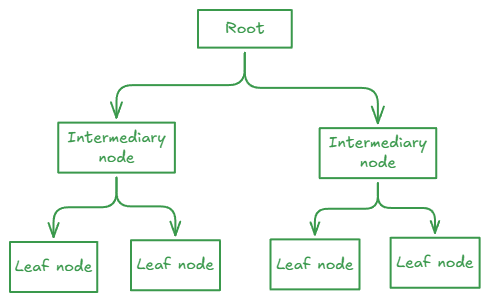
In the case of the tree used to represent indexes, the leaves of the tree will be the data pages, while the intermediate nodes will be the index pages.
Let’s look at an example of a clustered index (based on the primary key).
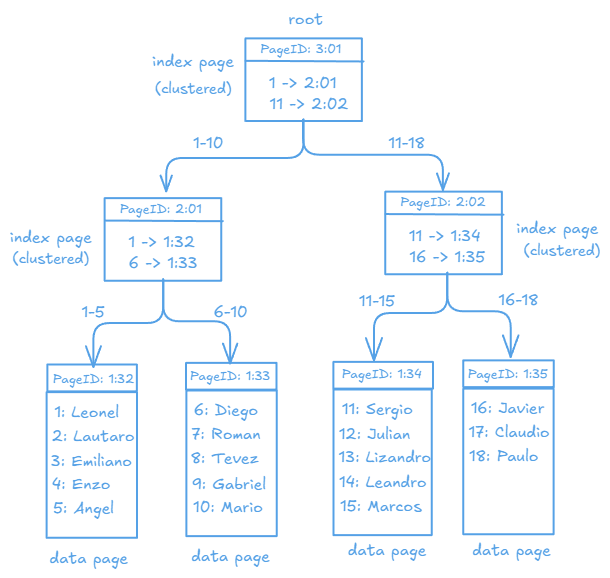
If, using these tables, a query were executed to retrieve the data of players whose IDs are between 1 and 5, only the leftmost branch of the tree would be traversed, avoiding a full scan of the table. Let’s see this in practice below.
The representation of secondary indexes will be covered in another article, but we will see how to handle them next.
Let’s look at the importance of indexes.
Suppose we have a table like the following:
CREATE TABLE employees (
    id INT,
    name VARCHAR(100),
    last_name VARCHAR(100),
    email VARCHAR(50) UNIQUE,
    department VARCHAR(100),
    salary DECIMAL(10, 2)
) ENGINE=InnoDB;
As you can see, it is a simple table that does not have a primary key defined. For our example, we have created a stored procedure that will help us populate this table. I’ll leave the code below in case you’re interested (I made this procedure with the assistance of DeepSeek AI).
DELIMITER $$

CREATE PROCEDURE InsertRandomEmployees()
BEGIN
    DECLARE i INT DEFAULT 0;
    DECLARE random_name VARCHAR(100);
    DECLARE random_last_name VARCHAR(100);
    DECLARE random_email VARCHAR(50);
    DECLARE random_department VARCHAR(100);
    DECLARE random_salary DECIMAL(10, 2);

    WHILE i < 100000 DO
        SET random_name = CONCAT('Name', FLOOR(RAND() * 100000));
        SET random_last_name = CONCAT('LastName', FLOOR(RAND() * 100000));
        SET random_email = CONCAT('email', i + 1, '@example.com');  --
        SET random_department = ELT(FLOOR(1 + RAND() * 5), 'Sales', 'Marketing', 'IT', 'HR', 'Finance');
        SET random_salary = RAND() * 10000;

        INSERT INTO employees (id, name, last_name, email, department, salary)
        VALUES (i + 1, random_name, random_last_name, random_email, random_department, random_salary);

        SET i = i + 1;
    END WHILE;
END$$

DELIMITER ;
As you can see, we inserted about 100K records. Once the table is populated, we execute a query like the following:
select count(*) from employees where department='Marketing';
At first glance, nothing seems wrong—it is syntactically correct. However, if we analyze the query, we will see:
 explain select * from employees where department='Marketing';
+----+-------------+-----------+------------+------+---------------+------+---------+------+-------+----------+-------------+
| id | select_type | table     | partitions | type | possible_keys | key  | key_len | ref  | rows  | filtered | Extra       |
+----+-------------+-----------+------------+------+---------------+------+---------+------+-------+----------+-------------+
|  1 | SIMPLE      | employees | NULL       | ALL  | NULL          | NULL | NULL    | NULL | 99661 |    10.00 | Using where |
+----+-------------+-----------+------------+------+---------------+------+---------+------+-------+----------+-------------+
1 row in set, 1 warning (0.00 sec)
No index could be used, and the query performed a full scan, going through all 100K records in our table. At this rate, as the table continues to grow, the query performance will deteriorate further. (The column "rows" shows 99661 because it is only an approximate value.)
Let’s take the EXPLAIN to the next level by using **ANALYZE** for more details:
 explain analyze select * from employees where department='Marketing';
+---------------------------------------------------------------------------------------------------------------------------------------------------------------------------------------------------------------------------------------+
| EXPLAIN                                                                                                                                                                                                                               |
+---------------------------------------------------------------------------------------------------------------------------------------------------------------------------------------------------------------------------------------+
| -> Filter: (employees.department = 'Marketing')  (cost=10102.35 rows=9966) (actual time=0.037..50.405 rows=20052 loops=1)
    -> Table scan on employees  (cost=10102.35 rows=99661) (actual time=0.017..42.679 rows=100000 loops=1)
 |
+---------------------------------------------------------------------------------------------------------------------------------------------------------------------------------------------------------------------------------------+
Here the problem is clearer. Explanation of the result:
Operation: Filter:
Description: A filter is applied to select only the rows where `department = 'Marketing'`.
Estimated cost: 10102.35 cost units. This value is an estimate of how much effort MySQL requires to perform this operation.
Estimated rows: 9966 rows. MySQL estimates that approximately 9966 rows will meet the condition `department = 'Marketing'`.
Actual time:`0.037..50.405`: The time it took to perform this operation. The first value is the initial time to find the first row, and the second value is the total time to process all rows.
Actual rows: 20052 rows. This is the actual number of rows that meet the condition.
Loops: 1. Indicates that this operation was executed once.
Operation: Table scan on employees:
Description: A full table scan is performed on the `employees` table to find the rows that meet the condition.
Estimated cost: 10102.35 cost units.
Estimated rows: 99661 rows. MySQL estimates that it will scan approximately 99661 rows.
Actual time:`0.017..42.679`: The time it took to perform the full table scan.
Actual rows: 100000 rows. This is the total number of rows in the `employees` table.
Loops: 1. Indicates that this operation was executed once.
If we finally execute the query:
select count(*) from employees where department='Marketing';
+----------+
| count(*) |
+----------+
|    20052 |
+----------+
1 row in set (0.04 sec)
The estimates were not wrong—the actual filtered rows from above were 20052, and the estimated scan time was 0.04.
While this works, it is not acceptable and needs improvement. Let’s try making two changes: first, by creating a primary key on the `id` column (this will require rebuilding the table), and second, by creating a secondary index on the `department` column since it is part of the search condition (WHERE clause).
Adding PK and secondary index:
(table will be re-created and re-populated again)
CREATE TABLE employees2 (
    id INT PRIMARY KEY AUTO_INCREMENT,
    name VARCHAR(100),
    last_name VARCHAR(100),
    email VARCHAR(50) UNIQUE,
    department VARCHAR(100),
    salary DECIMAL(10, 2)
) ENGINE=InnoDB;
New index:
CREATE INDEX idx_department ON employees2 (department);
Once created, let’s repeat the EXPLAIN.
 explain analyze select * from employees2 where department='Marketing';
+--------------------------------------------------------------------------------------------------------------------------------------------------------+
| EXPLAIN                                                                                                                                                |
+--------------------------------------------------------------------------------------------------------------------------------------------------------+
| -> Index lookup on employees2 using idx_department (department='Marketing')  (cost=4335.55 rows=39268) (actual time=0.200..32.259 rows=20062 loops=1)
 |
+--------------------------------------------------------------------------------------------------------------------------------------------------------+
1 row in set (0.04 sec)
Only the created index will be used for the execution of the query in a single iteration.
The results:
select count(*) from employees2 where department='Marketing';
+----------+
| count(*) |
+----------+
|    20062 |
+----------+
1 row in set (0.01 sec)
The query went from taking 0.04 to 0.01. Just 25% of execution time.
I had fun and learned a lot while writing this article. I hope you enjoyed it too.
See you in the next one!